Introduction
AI photo editing has transformed the way people create artistic and cinematic portraits. Instead of spending hours learning advanced editing software, anyone can now generate professional-looking images with a single detailed prompt. One of the most popular trends in 2026 is the Girl Sitting in Boat AI Photo Editing Prompt, featuring a peaceful lake, colorful water lily flowers, soft sunlight, and a dreamy cinematic atmosphere.
This editing style has become popular because it combines natural beauty with elegant portrait photography. The result looks like a scene from a movie, with realistic lighting, detailed reflections on the water, and a calm environment that makes every portrait stand out.
Whether you use ChatGPT, Gemini, Midjourney, Flux, Recraft, or another AI image generator, this guide explains everything you need to know. You’ll also find ready-to-use prompts for both girls and boys, recommended settings, useful tips, and answers to common questions.
What Is Girl Sitting in Boat AI Photo Editing Prompt?
A Girl Sitting in Boat AI Photo Editing Prompt is a detailed text instruction that tells an AI image generator exactly how to recreate a portrait. Instead of simply asking for a girl sitting in a boat, the prompt describes every important detail, including:
- Facial identity preservation
- Boat style
- Water lily flowers
- Lake reflections
- Natural lighting
- Camera angle
- Clothing
- Cinematic color grading
- Background scenery
- Image quality
The AI uses these instructions to create a realistic portrait while preserving the person’s facial identity if a reference image is provided.
This style is inspired by professional outdoor photography and combines nature, fashion, and cinematic storytelling into a single image.
Boys Version Prompt
The uploaded image should serve as the exclusive identity reference. Keep every facial detail true to the original person, avoiding any changes, beautification, or artistic reinterpretation.
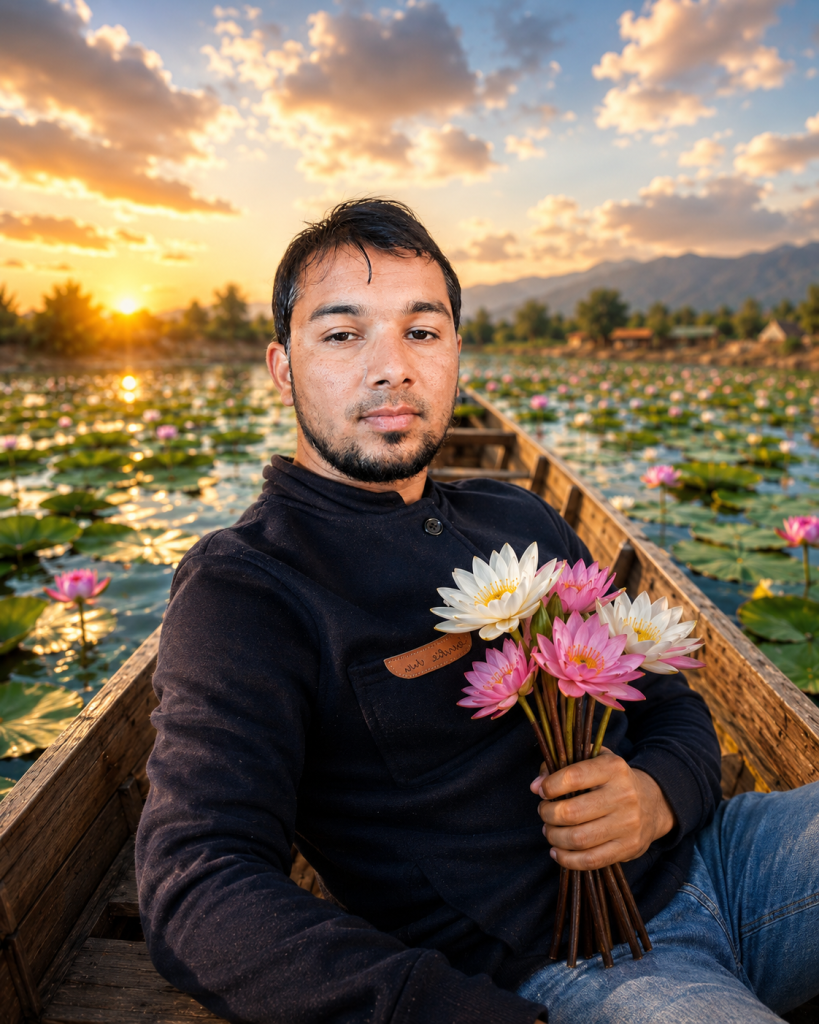
Create a cinematic portrait of the same person sitting confidently inside a handcrafted wooden boat surrounded by blooming water lily flowers on a peaceful lake. The subject wears a stylish casual white shirt with rolled sleeves and dark trousers. The environment features warm sunrise lighting, lush green trees, distant mountains, crystal-clear reflections on the water, and a calm natural atmosphere.
Use realistic lighting, shallow depth of field, cinematic HDR color grading, detailed water textures, realistic reflections, ultra-sharp focus, premium outdoor photography style, and 8K photorealistic quality.
Girl Sitting in Boat AI Photo Editing Prompt
Prompt:
Treat the uploaded photo as the sole identity reference for the portrait. Ensure the generated image matches the original person by keeping the facial proportions, hairstyle, skin tone, eyes, eyebrows, nose, lips, facial expression, and all recognizable details exactly consistent.
Create an ultra-realistic portrait of the same person peacefully sitting in a traditional wooden boat floating on a calm lake completely covered with blooming pink and white water lily flowers. The subject wears an elegant pastel-colored dress that naturally flows with the breeze. Warm golden-hour sunlight gently illuminates the face while soft cinematic light creates realistic shadows and depth.
The background features misty green mountains, lush trees, glowing reflections on the water, floating lily pads, and a dreamy natural atmosphere. The composition should feel peaceful, luxurious, and cinematic with shallow depth of field, realistic textures, HDR lighting, soft bokeh, highly detailed water reflections, natural colors, and professional photography quality.
Captured using an 85mm portrait lens, ultra-high resolution, photorealistic, cinematic color grading, 8K quality.
Girls Version Prompt
Use the uploaded reference image exclusively as the facial identity reference. Keep the facial identity exactly the same without changing facial proportions or appearance.
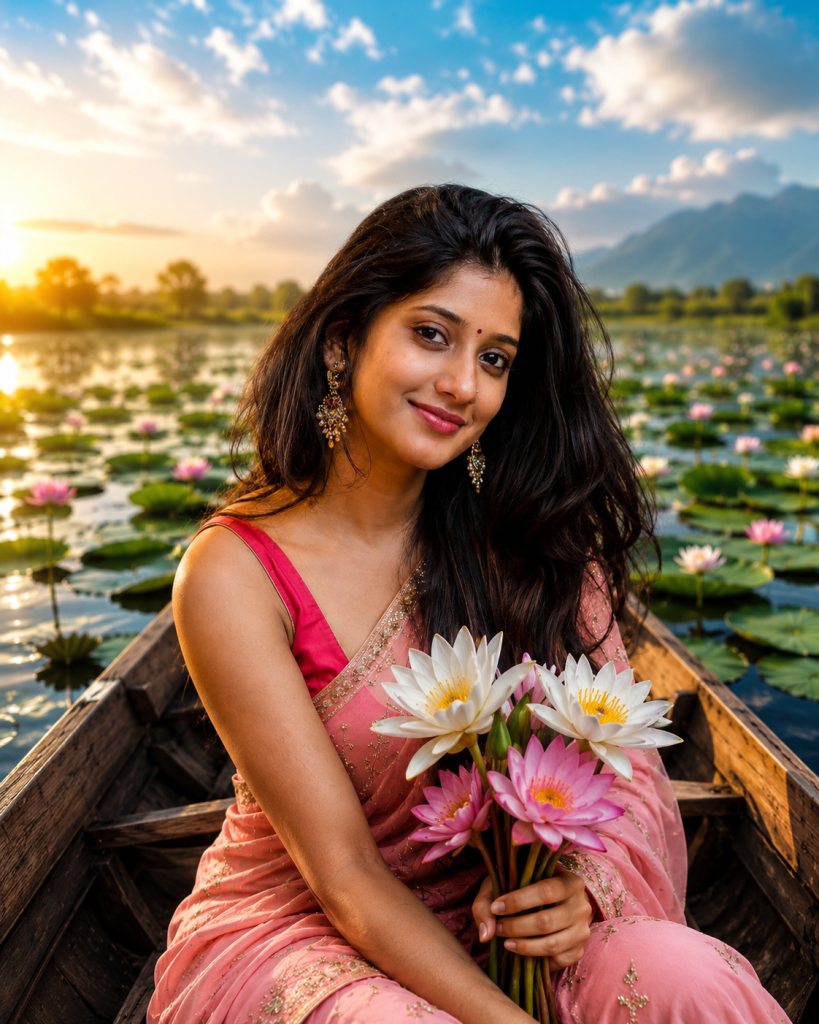
Generate an elegant portrait of the same woman sitting gracefully inside a beautiful wooden boat surrounded by blooming pink and white water lily flowers. She wears a flowing pastel floral dress with soft natural fabric movement. The lake reflects the golden evening sky while gentle sunlight creates a warm glow on her face.
The background includes green forests, distant hills, floating lily pads, subtle mist, soft bokeh, realistic water reflections, cinematic lighting, HDR colors, and professional portrait photography captured with an 85mm lens in ultra-high-resolution 8K quality.
Why This AI Photo Editing Style Is Trending
There are several reasons why this editing style has become one of the most shared AI portrait trends.
Beautiful Natural Scenery
The combination of a calm lake, colorful water lilies, and cinematic lighting creates a peaceful atmosphere that attracts viewers instantly.
Professional Photography Look
Even users without editing experience can generate images that look similar to expensive professional photoshoots.
Perfect for Social Media
These portraits are highly engaging on Instagram, Pinterest, Facebook, and other visual platforms because of their vibrant colors and realistic appearance.
Easy to Customize
You can easily change the season, clothing, lighting, background, flowers, or weather while keeping the same facial identity.
Supports Multiple AI Platforms
Most modern AI image generators understand detailed prompts, making this style accessible to everyone.
Best AI Tools
The following AI image generators work well for creating cinematic boat portraits:
- ChatGPT Image Generation
- Google Gemini
- Midjourney
- Flux
- Recraft AI
- Ideogram
- Leonardo AI
- Adobe Firefly
Each platform interprets prompts differently, so you may need small adjustments for the best results. Using a clear, high-resolution reference photo generally produces the most accurate facial identity.
Recommended Settings
For the best quality, consider these settings whenever they are available:
- Image Quality: Ultra High
- Resolution: 2048px or higher
- Aspect Ratio: 4:5 or 3:4 for portraits
- Style: Photorealistic
- Lighting: Golden Hour
- Camera Lens: 85mm Portrait Lens
- Depth of Field: Shallow
- Color Grading: Cinematic HDR
- Detail Level: Maximum
- Texture Quality: High
- Focus: Sharp Face
- Background Blur: Soft Natural Bokeh
These settings help produce images with realistic lighting, smooth skin textures, and natural-looking reflections.
Tips for Better Results
Creating an impressive AI portrait depends not only on the prompt but also on the reference image you provide.
- Upload a clear, high-resolution face photo.
- Use a front-facing image with good lighting.
- Avoid sunglasses or objects covering the face.
- Keep the prompt detailed but organized.
- Mention realistic lighting instead of fantasy effects if you want a natural appearance.
- Use cinematic color grading for richer colors.
- Include water reflections, flowers, and environmental details.
- If the first result isn’t perfect, slightly adjust the lighting or camera angle and generate again.
- Preserve facial identity in every prompt to maintain consistent results.
Frequently Asked Questions
Can I use this prompt with ChatGPT?
Yes. If your version supports AI image generation, you can upload your reference photo and use the prompt to create a similar cinematic portrait.
Does the face remain the same?
When you upload a clear reference image and specify facial identity preservation, the AI generally produces results that closely match the original person.
Can I change the flowers?
Absolutely. You can replace water lilies with lotus flowers, roses, lavender, sunflowers, cherry blossoms, or any other flowers by editing the prompt.
Can I change the season?
Yes. The same prompt can be modified for spring, summer, autumn, winter, rainy weather, or snowy landscapes.
Which aspect ratio works best?
Portrait ratios such as 4:5 or 3:4 are ideal for social media posts, while 16:9 is better for wallpapers.
Is this style suitable for Pinterest?
Yes. Cinematic nature portraits often perform well on Pinterest because they are visually appealing and highly shareable.
Conclusion
The Girl Sitting in Boat AI Photo Editing Prompt with Water Lily Flowers & Cinematic Nature Background is one of the most elegant AI portrait styles available in 2026. By combining detailed prompts, high-quality reference photos, and realistic cinematic settings, you can create portraits that look professionally photographed while preserving the subject’s original identity.
Whether you’re creating content for social media, designing wallpapers, or simply experimenting with AI creativity, this prompt provides an excellent starting point. Feel free to customize the clothing, lighting, flowers, scenery, and weather to match your personal style while keeping the facial identity consistent for the most realistic results.